
Settings sync
Your shortcuts on every computer, through a private Git repository you own: changed on one, picked up by the others. Macs share one list, Windows and Linux another.
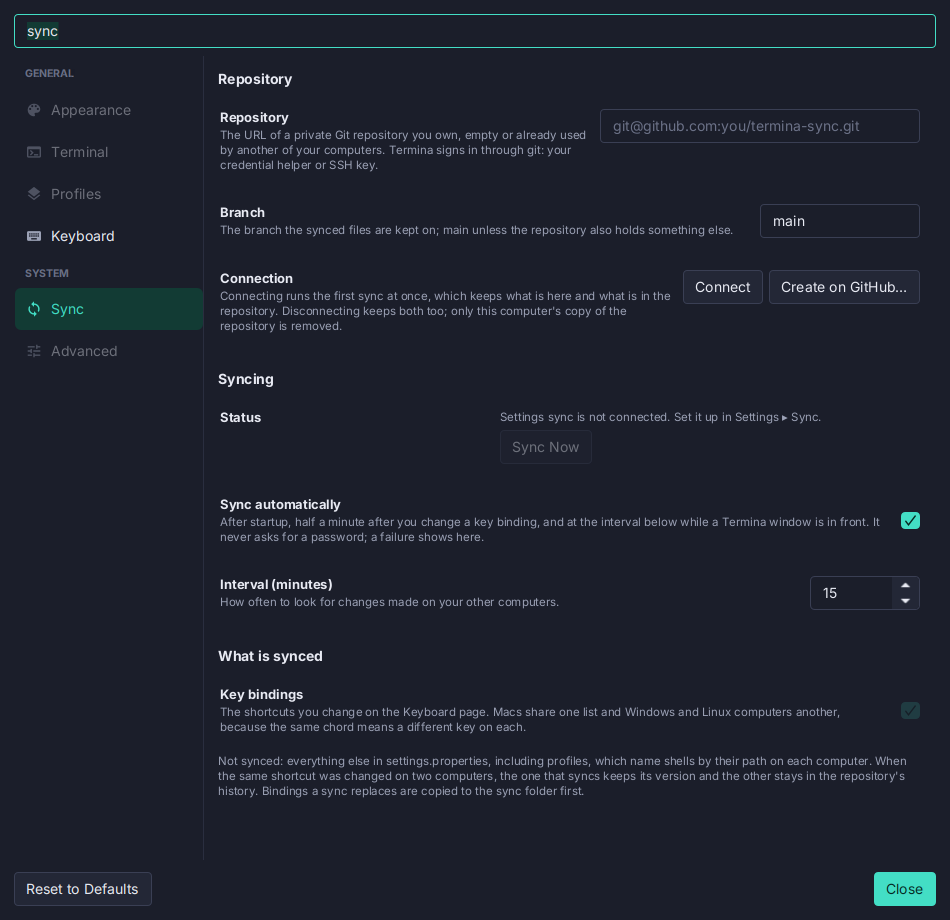
- A repository of yours. Settings → Sync takes its URL, and git does the rest with your credential helper or SSH key. There is no Termina account and no server of Termina’s.
- Or one made for you. With the GitHub CLI signed in, Create on GitHub… makes a private repository and connects to it, without a trip to the browser.
- It runs on its own. After startup, half a minute after you change a shortcut, and every 15 minutes while a Termina window is in front. File → Sync Settings Now, also in the palette, syncs from anywhere.
- One list per platform family. A chord means a different key on a Mac than on Linux, so Macs share
keybindings/macos.propertiesand Windows and Linux sharekeybindings/windows-linux.properties, in one repository. - Merged per command. Two computers that changed different shortcuts both keep them. A shortcut changed on both keeps the version of the computer that syncs, and the other stays in the repository’s history.
- Hard to lose work. Bindings a sync replaces are copied to
sync/backupsfirst, and a sync that would remove most of them stops and asks. - No secrets in the file. A URL with a password or token in it is refused, and an automatic sync never prompts. With several GitHub CLI accounts, sync remembers the one that can read the repository and keeps signing in as it, whichever is active.
- Only the key bindings. Themes, fonts and profiles stay on each computer.
See Settings sync.