Keyboard shortcuts
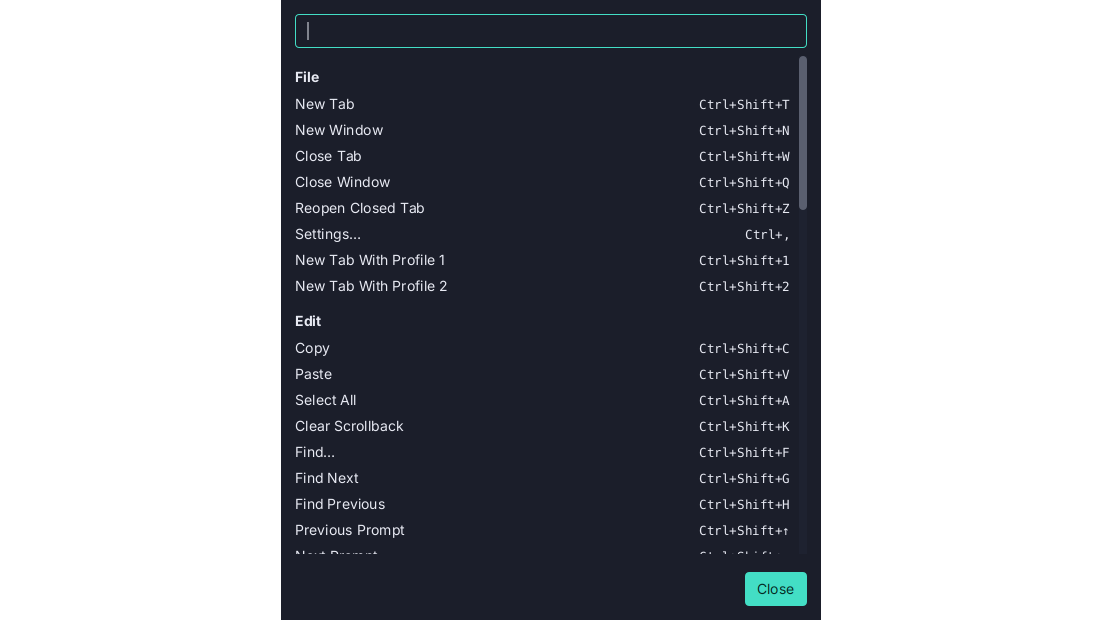
Application chords that leave the shell its keys: Ctrl+Shift+T on Linux and Windows, Cmd+T on macOS. Every one can be changed in Settings → Keyboard, and Help → Keyboard Shortcuts lists them, searchable.
Ctrl+Shift, neverCtrl, off macOS.Ctrl+Tis readline’s transpose,Ctrl+Wdeletes a word andCtrl+Cis SIGINT, so Termina’s chords add Shift:Ctrl+Shift+Tfor New Tab,Ctrl+Shift+CandCtrl+Shift+Vto copy and paste. On macOS they areCmdchords, which a shell never sees.- Every one can be changed. Settings → Keyboard lists each command under its menu: click its shortcut and press the new one. A shortcut another command has moves on a second press,
Backspaceremoves one, and Reset or Reset All Shortcuts puts them back. Commands with no shortcut of their own, such as Rename Tab, can be given one. - A bare key is refused. A function key works alone; any other key needs
Ctrl,AltorCmd, or the shell would lose it.Ctrlwith a letter is allowed off macOS, with a note that the shell no longer receives it. - A searchable reference. Help → Keyboard Shortcuts (
Ctrl+Shift+/,Cmd+/on macOS) lists every chord the window answers to, grouped by menu, with a search box. - Generated, not typed. The reference is built from the window’s own binding table, with the chords in force, so it cannot list a chord that does nothing. The menus, the palette and the tab strip’s tooltips follow a change at once too. The reference also lists the keys the terminal handles itself:
Shift+PageUpand friends,Shift+Insert,Ctrl+Insert, middle-click, the link modifier,Shift+drag, and double-clicking a tab to rename it. - One chord per command. The defaults are declared once, with their menu items, and tested for duplicates on every platform, and the Keyboard page moves a chord rather than sharing it, so a menu can never advertise a key that a different command takes.
- They work without the menu bar. The chords are handled by the window ahead of the terminal, so hiding the menu bar strands nothing.
- On every computer. The shortcuts you change can sync between computers through a Git repository of yours: see Settings sync.
The keybindings page has the defaults. See Keyboard.